DoorMaster User Guide
My Setup-Extras > Handles Door and the Handles Drw pages provide the ability to set handle machining as...
If handles are used for doors and/or drawers in your current job, enable the required Use Handles checkbox/s in your Drawing Properties and select from the drop list the handle name for use.
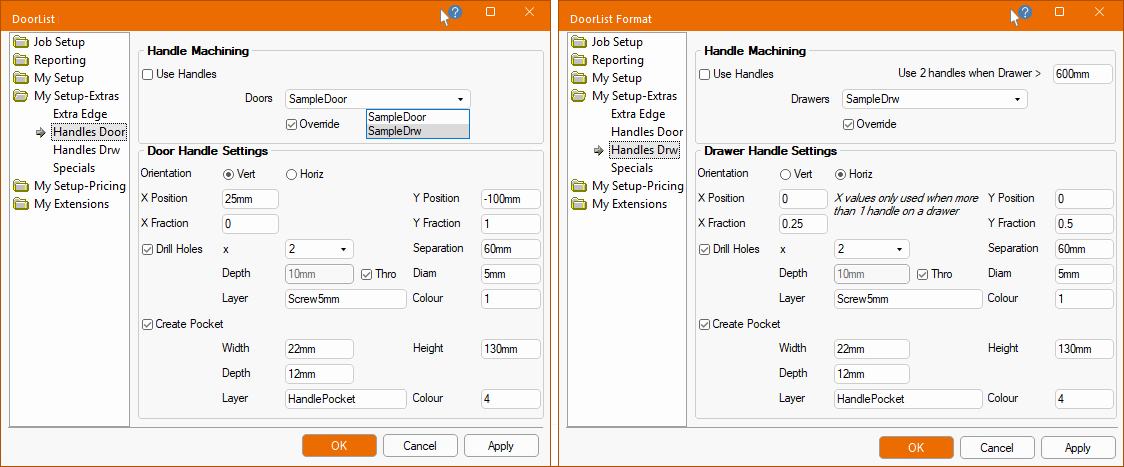
The Doors or Drawers drop list selection shows all the entries in the Handle Lookup Table accessed from the My Setup > Tables page of the Drawing Properties.
Unticking the Override checkbox will reset all the values back to the defaults of the selected Handles Lookup Table.
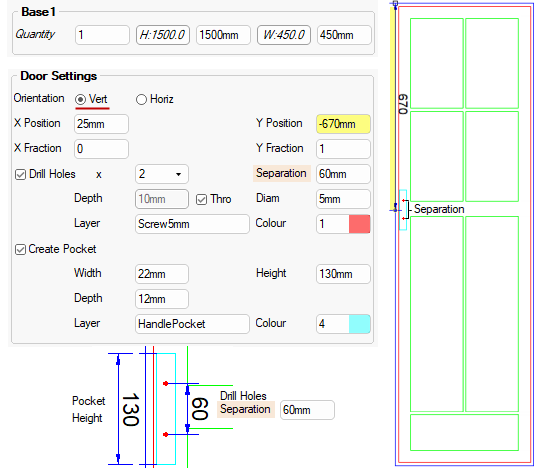
The side handles, if not otherwise specified in the Drawing Properties, is set left but you can use the...
- Switch Sides option to move the handle to the opposite side of the door.
- Both Sides option allows two handles on a door
- when used, the 'Switch Sides' option is no longer available (i.e. greyed out).
Orientation : Position holes and/or pockets either Vertically or Horizontally.
Position : The position of both the holes and pockets are defined by their centre.
- To centre the handle drill holes, the Y Position is measured from top of door (if Vertical) i.e. -670mm. with a Y Fraction of 1.
The calculation uses the X Position, X Fraction, Y Position and Y Fraction amounts, where the Frac is a fraction of the total width (or height depending on orientation) - see Drawers example.
The Use Drill Holes checkbox allows you to designate 1 or 2 drill holes (circle) using the drop list.
The Use Create Pocket checkbox allows you to create a handle pocket (rectangular cutout), which is typically where the handle is integrated into the door itself, creating a seamless look.
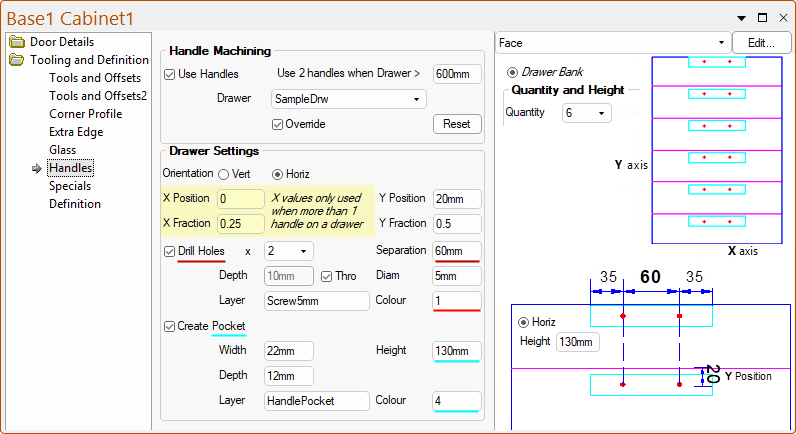
When handles are used for Drawers, then you have the added option to specify when 2 handles are to be used.
The radio buttons allow you to position holes and/or pockets either Vertical or Horizontal.
The position of both the holes and pockets are defined by their centre.
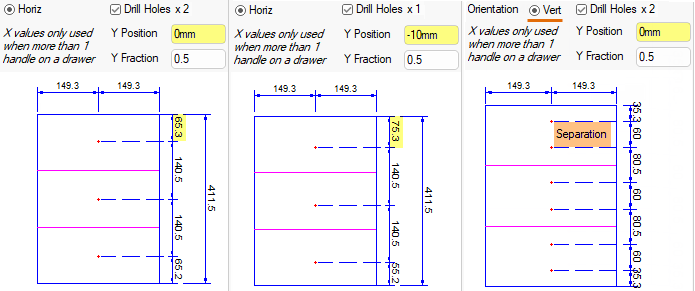
- 1 handle : Only uses the Y Position and Y Fraction amounts, where the Frac is a fraction of the total width (or height depending on orientation).
- If a handle had a single hole at Y Position= 0mm and Y Fraction= 0.5 then a single hole would be drilled at half the door width.
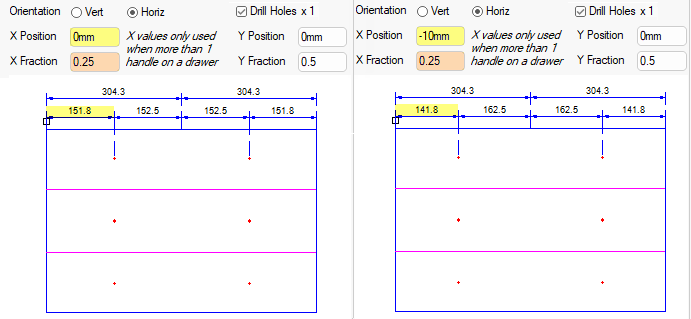
- 2 handles : Uses the X Position, X Fraction, Y Position and Y Fraction amounts, where the Frac is a fraction of the total width (or height depending on orientation).
- If a handle had a single hole at X Position= -10mm and X Fraction= 0.25 then a single hole would be drilled 10mm short of quarter the door width.
Note that in drawers the X position of the handle is always half way across the drawer and the XPos and XFrac values are only used if two handles are required.
The settings then assume the left handle. The right handle is assumed to be in a similar position on the other side of the drawer.
The Use Drill Holes checkbox allows you to designate 1 or 2 drill holes (circle) using the drop list.
The Use Create Pocket checkbox allows you to create a handle pocket (rectangular cutout), which is typically where the handle is integrated into the door itself, creating a seamless look.