
DoorMaster User Guide
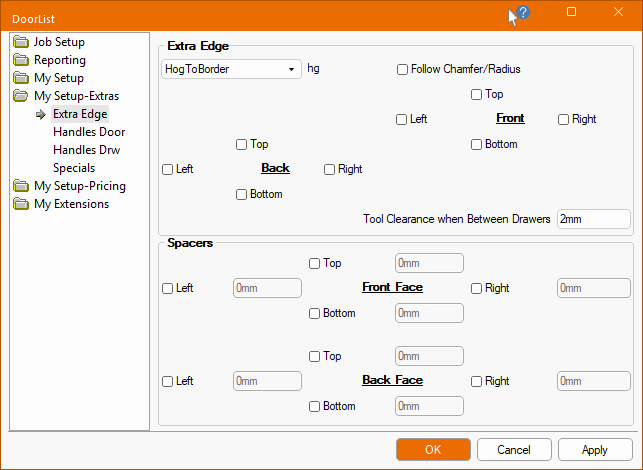
The My Setup-Extras > Extra Edge page of the Drawing Properties allows you to set the defaults for the current job to run an extra edging toolpath along (or offset from) chosen edges of the doors e.g. can be used for recessed handles.
These settings can be overridden at door level on the Door Details > Extra Edge page.
The Tooling and Definition > Extra Edge page allows you to turn the use of additional tooling ON/OFF for individual doors/drawers.
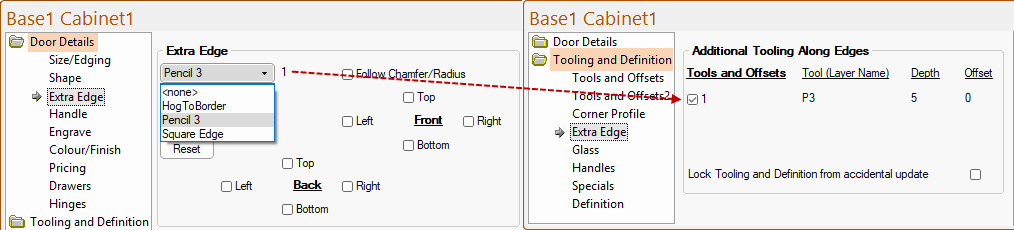
Extra Edge is used for features such as recessed handles or 'V' Grooves on door tops and is also available when the door is made into drawers.
The Tool Clearance when Between Drawers option allows you to specify a clearance distance from the next drawer e.g. 2mm.
The tool diameter is part of the definition set in the Edging tool table.
If a DrawerBank is being made and the Extra Edging is only required on just one of the adjoining edges (e.g. just the top edge), then it is important that the system know the Diameter of the tool (so that the part can be made large enough and split up accordingly.
Spacer options which provides the ability, for all doors, to add spacers to push doors apart on the nest and ensures a door is not nested too close to another.
These options can be overridden on the Door Details > Extra Edge page. Spacers are parallel to the edge of the part, instead of being perpendicular. As EzyNest is a true shape nesting product, the parallel spacers will stop small parts being nested next to the door (whereas a perpendicular one would allow this).
For example, on a 300mm wide door, turning on the Left spacer and setting it to a value of 60mm results in this.
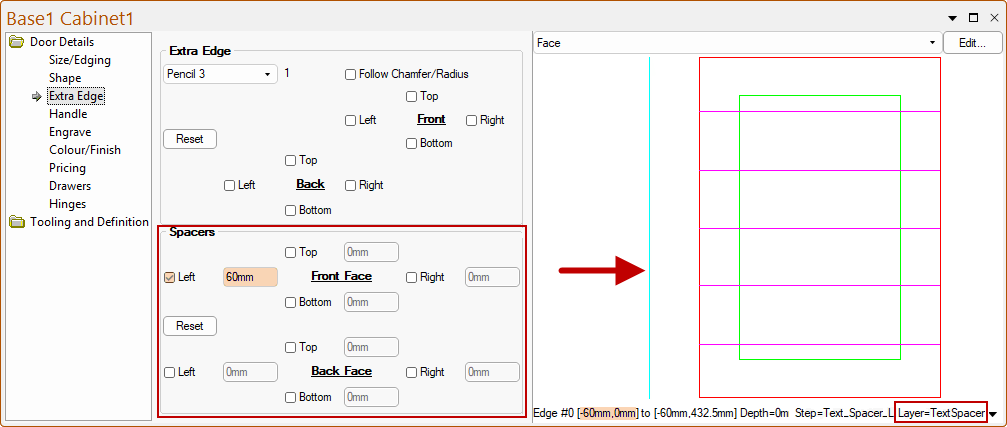
Automatic spacers are only applied to the Front Face machining. If the Back Face machining is used/required, they will need to be manually added.
The Edge Profile can also be automated (also in front face only) based on the selection of edging tool as an Edge Profile or When Extra Edge.