DoorMaster User Guide
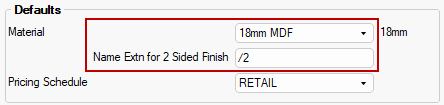
My Setup > Defaults page in the Catalog/Drawing Properties sets the default door material and pricing schedule.
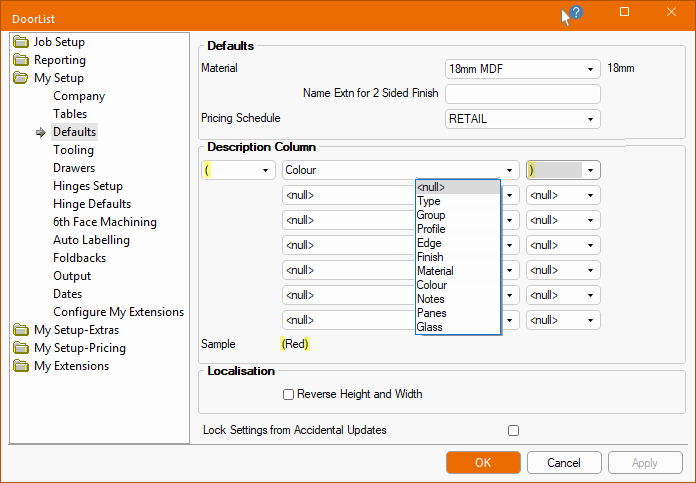
Material : Sets the default door material which can be changed locally for each door.
Name Extn for a 2 Sided Finish : Allows the specifications of the text to append to the material name used on a door/drawer finished on 2 sides.
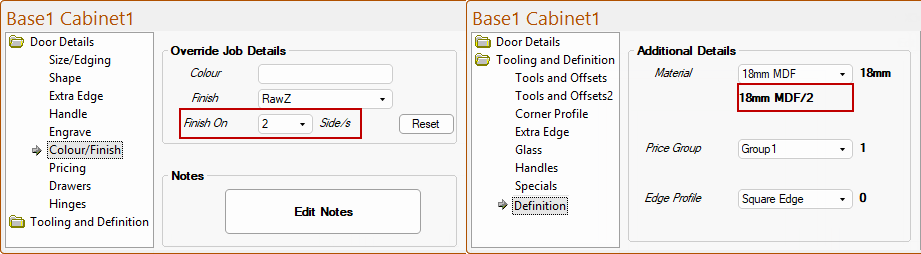
The extension, if used, is displayed on the Tooling and Definition > Definition page at door level.
This default can be changed on the Door Details > Colour/Finish page.
Pricing Schedule : This default is used if the Client details are keyed in directly, rather that being selected from the Client table - see related topic.
The Custom codes can be made up of a collection of linked properties (evaluated individually for each part), each property delimited by a single character (each of which is individually chosen).
The possible properties that can be selected from the drop list, as shown above, are:
The possible delimiting characters are:
| Delimiter | Delimiter | Delimiter | Delimiter | Delimiter |
| <null> = Nothing | ^ | // | x | [ |
| = Space | & | \\ | , | ] |
| @ | ? | _ | . | { |
| # | ! | * | ; | } |
| $ | / | - | : | < |
| % | \ | + | ( | > |
| = | ) |
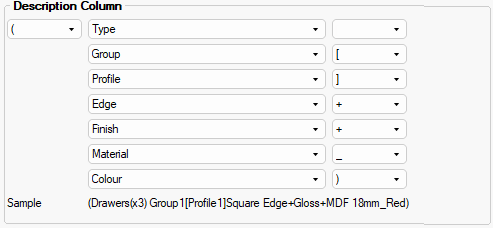
An example of a Custom code using...
defines a code of...
(Type Group [Profile]Edge+Finish+Material_Colour)