Hinges page : Door Details
In This Topic
The Door Details > Hinges page at allows you to override the defaults for the vertical positioning and quantity of hinges.
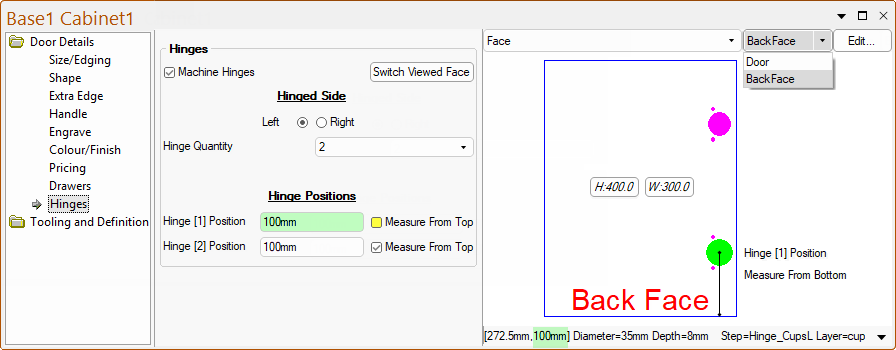
The Use Machine Hinges checkbox allows you to turn on/off this option to specify whether hinge holes are present or not in the machining of doors.
- If present, you can select the Hinged Side (Left or Right) and the Hinge Quantity (1-6) using the .
Hinge Positions
There are up to six hinge positions that can be present. The options made available are dependent on the Hinge Quantity.
- For example, the image above has a Hinge Quantity of 2 and Position details are provided for the first 2 hinge positions.
- For the image below, a Hinge Quantity of 6 has been selected and Position details are provided for the all 6 hinge positions.
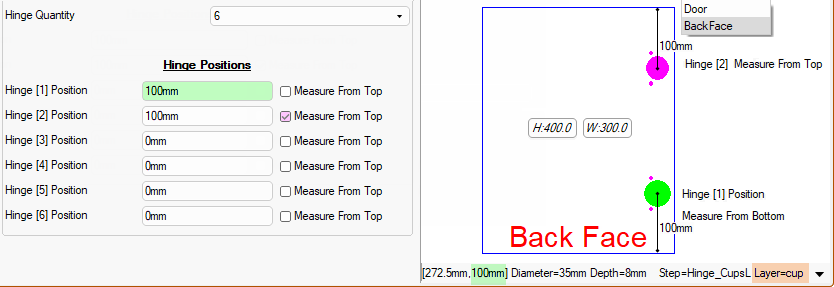
The distance of the upper and lower hinges can be set from either...
-
Measure From Top - if checkbox ticked, measures distance From Top of door down to the centre of the Hinge Cup;
- e.g. Hinge [2] measures a distance of 100mm down From Top to the centre of the Hinge Cup;
or
-
Measure From Bottom - if checkbox unticked, measures distance From Bottom of door up to the centre of the Hinge Cup;
- e.g. Hinge [1] measures a distance of 100mm up From Bottom to the centre of the Hinge Cup;
On the My Setup > Hinges Setup page, Hinge Specifications and Machining Properties, such as the setback, spacing, depth, diameter and layer names are set.
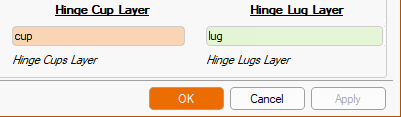
To view correctly in the Preview Pane or the Machine Editor, then you need to select the Back Face of the door.
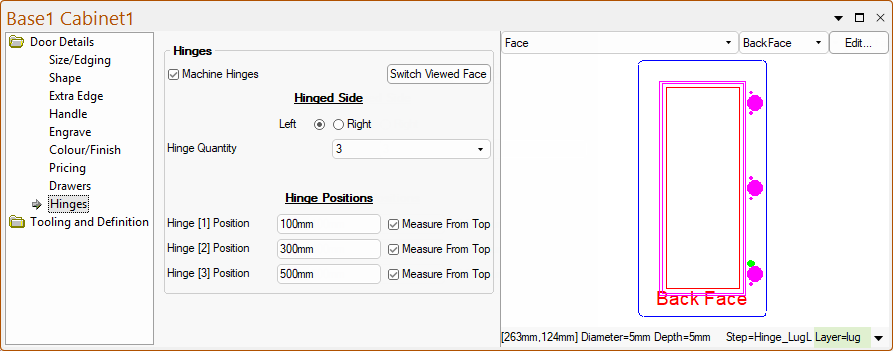
In the following example, three (3) hinges are required and each one Measured From Top.
- The preview pane has the Hinge [1] Position Hinge_LugL (Left) is selected and the Layer name =lug (compare to above image of Hinges Setup options).
- The Diameter=5mm and Depth=5mm is also specified on the Hinges Setup page.
See Also