DoorMaster User Guide
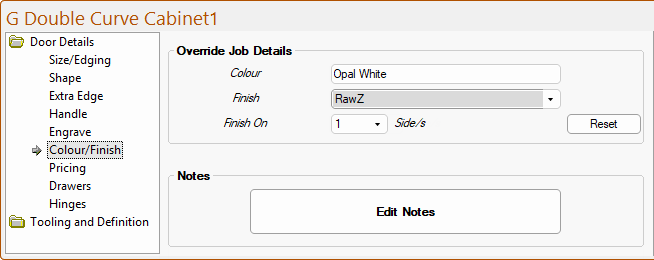
The Door Details > Colour/Finish page at door level allow the selection of the Door Colour, Finish and Finished On are overrides for the Job defaults.;
When creating doors to add to the library, it is advisable to leave these to default to the current Job Details page - click to view.
The defaults for the Finish and Colour details are set on the Job Setup > Job Details page.
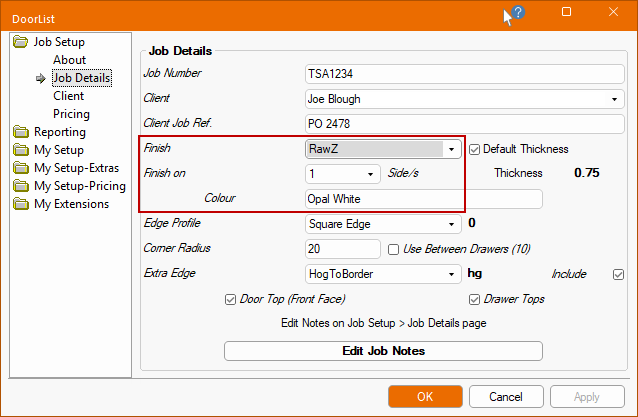
The Colour is an optional free text entry which defines the final colour of the door and can be shown on reports/labels.
The Finish for the doors can be selected from the drop list of available finishes.
The Finish On drop list allows you to select whether the doors are to be finished on 1 or 2 Side/s.
The Finish and Finish On settings are used to determine the job pricing - see details on the My Setup-Pricing > Prices page.
The Reset button can be used if you wish to revert amendments back to the default settings i.e. Job Setup > Job Details page of the Drawing Properties.
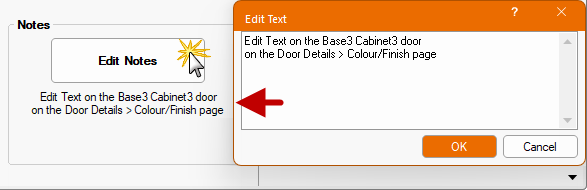
Clicking on the Edit Notes button provides the ability to type in free text notes concerning this door.
When you exit from the edit box the notes will be shown in the area beneath the button.
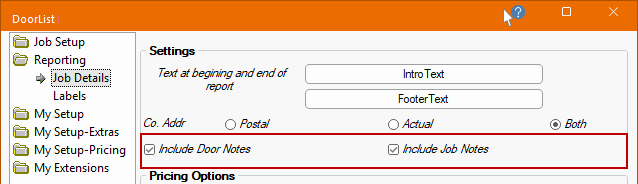
These Door Notes can be optionally output onto the Job Details report.