
DoorMaster User Guide
DoorMaster Software is a specialised door production package containing feature which make it easy to set up door styles with arches, decorative corners, veins and other features required for a comprehensive range of doors.
This User Guide is part of our commitment to providing you with the tools to get started and familiar with your business investment by explaining...
Use the Context Help feature for a quick and easy way to find relevant help when you are working in DoorMaster!
Use Alt + left arrow to return to where you were before a hyperlink jump. Try it by clicking on any of the above links and then return here!!
Upgrades
A major application upgrade is released officially about once a year with the latest library build and requested door options. Upgrades ensure that your software keeps up with Windows software and industry standards/requirements which are reflected in this guide.
Upgrades can be purchased separately - discuss this with your Product Consultant.
 icon for topic information.
To find videos  for example, type in the search bar "watch and video" for all videos included in this documentation.
Or to narrow down the search type in "watch and video and dimensions".
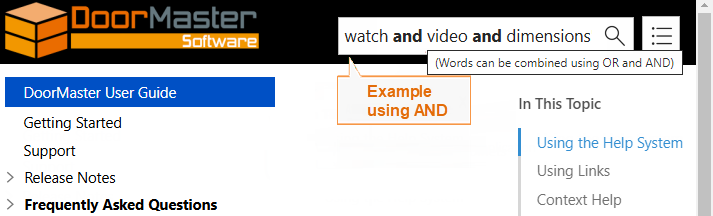
Click to view Search Result comparisons
From the list of Search Results, select the relevant topic from the list.
Note: By checking the Highlight Search terms checkbox you can highlight your search keywords in each topic.
 after them and open in a new browser window when clicked.
<-- hover over links momentarily for information on where they lead.
after them and open in a new browser window when clicked.
<-- hover over links momentarily for information on where they lead.Context Sensitive Help is a quick and easy way to find relevant help when you are working in DoorMaster.
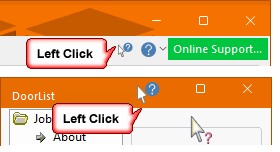
Simply, click on the Context Help  button [the cursor will change to a question mark
  ] and then...
 click on any of the commands on the ribbon; or
click on an open Drawing Tool, before or after placement e.g. Label tool;
or
click on a selected page of an opened shape, before or after placement.
Context Sensitive Help is also available for all Property Sheets.
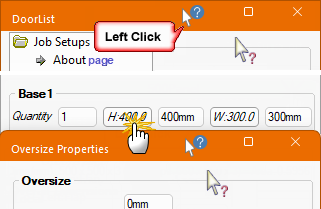
First open the page/dialog and click on the Context Help  button in the title bar and then...
 click on the relevant page of the Catalog/Drawing Properties;
or
click on the Properties Sheet accessed from a shape page.
Watch the Video Stop spending valuable time searching for just the right documented information - step into the future with Context Help!
