
DoorMaster User Guide
 |
This purple button  initiates online support via the internet and takes you directly to a website that you can chat directly with a support technician during support hours.

If you have landed here when using the button, you have accidently clicked somewhere on the command group headings. Try again!

There are two types of Context Help which can be used to quickly and easily locate relevant help topics in this user guide.
 button located on the top right of the main window;

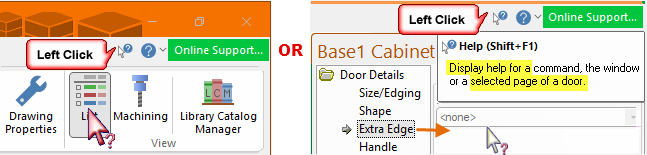

Keyboard Shortcut: F1
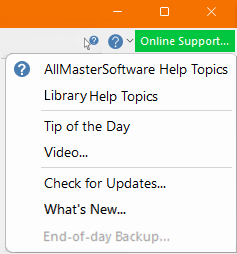
Opens the DoorMaster Users Guide (this document) which covers all features including the DoorMaster Library.
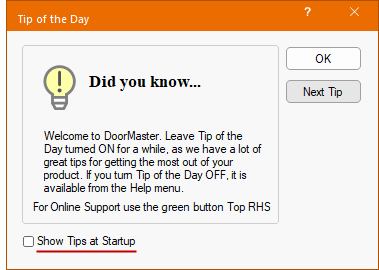
Displays the Tip of the Day dialog, which gives you handy hints on using DoorMaster.
This dialog will also be shown automatically when you start the program, but can be turned off by unchecking the 'Show Tips at Startup' checkbox. Use the 'Next Tip' button to cycle through the list of hints, and click OK to close the dialog.
There are also clickable links to help your with more assistance, such as a link to our YouTube video channel or a link to our Knowledge Base documentation etc.
Our Support Team regularly creates new videos and this option will take you directly to CabMaster Software™ YouTube site.
Where relevant, videos created by our Support Team are located at the end of the related topic within this online User Guide, as per the video below.
To find all included  videos, simply type in the search bar "watch and video".
If you have an area you would like more information on, please send us an email request and we will try to get one created for you.
Automatic Updates are not available for DoorMaster. When available, our Support Team will provide you with applicable links.
This is a link to the application release update notes.
This initiates an end of day backup. It does this by executing the batch file backup.bat in the same folder as DoorMaster.
If this option is "greyed out", it indicates that there is no existing backup.bat file. The backup.bat file can be created/modified it to suit your requirements.
 |
Minute with Mike : See how easy it is to access helpful documentation with our Context Help function. [1:35 mins]

