
DoorMaster User Guide
File Options is available using the keyboard shortcut F10 or from the File menu or the Start Up dialog (Advanced button).
The File Locations dialog is used to tell DoorMaster where it can find the various components it requires which, for normal usage, need not be modified.
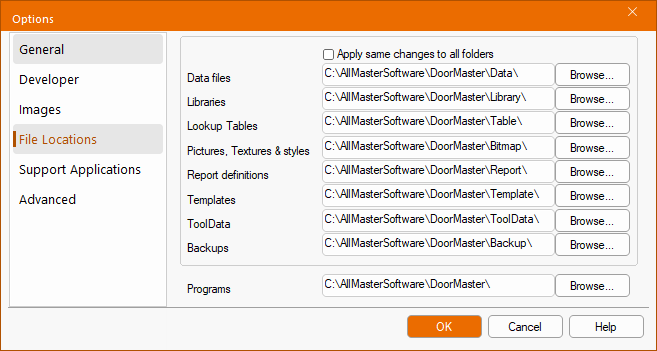 |
To change a path, either type in the new location manually or use the Browse button next to the appropriate text box.
Apply same changes to all folders
If checked, DoorMaster will try to intelligently update all the other program locations when a change is made. It attempts to modify the other paths so that they stay in the same relative location to each other. This is handy when the entire DoorMaster folder and subfolders have moved i.e. simply check the box and change the Programs location.
Each text box contains a full path (Location) to a part of the DoorMaster package, as shown in the above example. Related files have different extensions pertaining to their File Type.
| Name | Default Location | File Types |
|---|---|---|
| Data Files | DoorMaster\Data | QID (saved drawings) |
| Libraries, Catalogs, Images | DoorMaster\Library | QIL, QIM, QIZ |
| Lookup Tables | DoorMaster\Table | QLT |
| Pictures, Textures & Style | DoorMaster\Bitmap | BMP, GIF, JPG etc |
| Report Definitions | DoorMaster\Report | RPT |
| Templates | DoorMaster\Template | QIT |
| ToolData | DoorMaster\ToolData | QTD |
| Backups | DoorMaster\Backup | TMP (autosaved drawings) |
| Programs (see Tip above) | DoorMaster | EXE, QTD, DLLs |